
Summary
Editor's rating
Value: good product, but you pay for the ecosystem
Design: more like a gadget, less like a hospital tool
Battery life: the thing you’ll mostly forget about
Comfort and daily use: fine for one person, okay for sharing
Performance, app sync, and multi‑user handling
What you actually get with the BPM Vision
Effectiveness: accuracy and real‑world reliability
Pros
- Accurate and consistent readings with clear color‑coded feedback on a large screen
- Automatic Wi‑Fi/Bluetooth sync to the Withings app and Apple Health for easy long‑term tracking
- Practical case that doubles as a stand, plus simple on‑screen tutorials that guide proper use
Cons
- High price compared to basic blood pressure monitors with similar core measurement function
- Initial setup and pairing can be finicky, especially on some phones and networks

Specifications
View full product page →| Brand | Withings |
A smart BP monitor that actually feels smart
I’ve been using the Withings BPM Vision at home for a couple of weeks, mainly because my doctor asked me to track my blood pressure more seriously. I’ve used cheaper cuffs before (Omron and some random pharmacy brands), so I wasn’t exactly excited to pay this much for another one. But I was curious about the Wi‑Fi sync, the big screen, and the color zones that tell you instantly if you’re in the red or not.
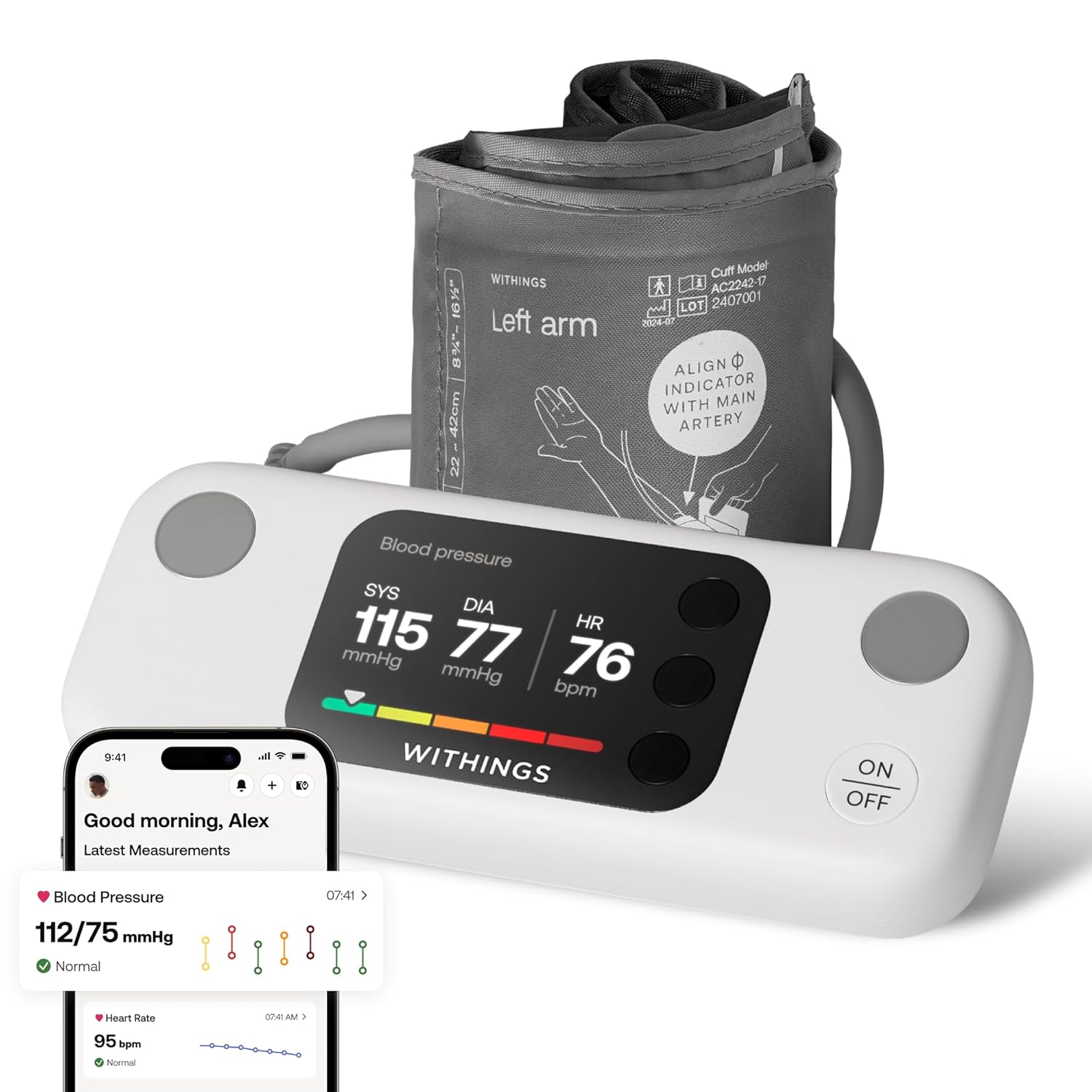
In day‑to‑day use, the first thing that stood out is how fast and clear the readings are. You strap it on, hit the button, and in around 30–40 seconds you get systolic, diastolic, and heart rate on a bright screen that’s actually readable without squinting. No weird codes, no tiny numbers. The color bar is pretty handy: green, yellow, orange, red, matching the American Heart Association levels. You don’t need to be a nurse to understand if it’s good or bad.
What really makes it different from the basic cuffs is the automatic sync and history. As soon as I’m done, the reading appears in the Withings app on my phone, and it also ends up in Apple Health. No manual typing, no photos of the screen, nothing. For long‑term tracking, it’s a big step up compared to the cheap standalone devices. I can scroll back through weeks and see trends instead of random numbers on sticky notes.
It’s not perfect though. The price stings, and the initial setup was more annoying than it should be. Getting the Wi‑Fi and Bluetooth pairing right took me longer than expected for something that’s supposed to be plug‑and‑play. Once that part is done, the product is pretty solid, but I can see some people giving up during the first setup if they’re not patient or not very comfortable with apps.
Value: good product, but you pay for the ecosystem
Let’s be blunt: this thing is not cheap. There are plenty of arm blood pressure monitors out there for half the price, sometimes even less. If all you need is an occasional reading and you’re fine jotting numbers down in a notebook, this will feel overpriced. The hardware itself is solid, but part of what you’re paying for is the app, Wi‑Fi, and integration with Apple Health and the rest of the Withings ecosystem.
Where the value starts to make sense is if you actually plan to track your blood pressure long term and share it with a doctor. The automatic sync, history, and export features save time and reduce the chance you’ll forget or mess up your logs. If you already own a Withings scale or watch, it fits nicely into that setup and gives you a more complete view of your health data in one place. In that scenario, paying extra for a smoother experience is easier to justify.
On the other hand, at this price level, I expected the setup experience to be smoother. The fact that pairing can be finicky, especially on some phones, makes the whole thing feel a bit overpriced. Also, it’s manufactured overseas (which is normal these days), so the high price isn’t about “made in Europe/US” craftsmanship or anything like that. You’re really paying for the software, the big screen, and the brand.
In my opinion, the value is pretty solid if you: 1) need frequent readings, 2) care about clean graphs and app sync, and 3) already use or want to use other Withings devices. If you just want a basic, no‑frills cuff for occasional checks, you can get something cheaper that will do the job well enough. This one is more for people who are a bit nerdy about their health data or who have a medical reason to track things closely and regularly.
Design: more like a gadget, less like a hospital tool
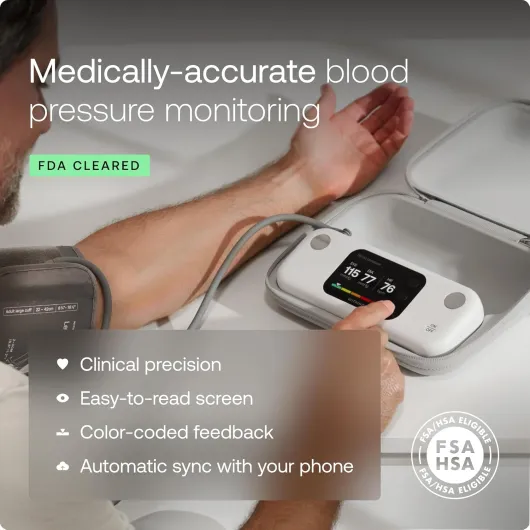
Design‑wise, the Withings BPM Vision looks more like a sleek tech gadget than the usual clunky medical device. It’s a long, rectangular unit with the cuff wrapped around it, and it slides neatly into a rigid case. When you open the case and use it as a stand, the monitor sits at a nice angle, which is actually practical: you don’t have to bend over or twist your neck to see the numbers. It sounds like a small detail, but when you’re doing this every day, it matters.
The buttons and interface are very simple. There’s basically one main button to start the measurement and navigate basic options. The tutorials and instructions show up directly on the screen, so you’re not constantly reaching for a paper manual. For someone not very tech‑savvy, that’s a big plus. My honest take: this is one of the least confusing BP monitors I’ve used. You strap, press, wait, read. No complicated menu diving.
Size and weight are not tiny though. It’s about 8.2 x 3.2 x 1.5 inches and weighs around 2.3 pounds with everything. You can travel with it, but it’s not as pocketable as the super‑light cuff‑only devices. I took it on a weekend trip and it was fine, but it definitely takes more space in the bag than a basic cuff. On the flip side, that extra bulk gives it a more solid, stable feel when it’s on the table or in the case stand.
Visually, it’s clean and modern, nothing flashy. Neutral colors, no huge hospital branding, so you can leave it on a shelf without it screaming “medical issue here”. If you care about aesthetics, it blends into a home environment better than most medical electronics. If you don’t care at all, you’ll just notice that it looks and feels a bit more premium than the $40 units at the pharmacy.
Battery life: the thing you’ll mostly forget about
The BPM Vision is battery powered and Withings claims around a year of battery life. I obviously haven’t hit a full year yet, but after a couple of weeks using it once or twice a day, the battery indicator hasn’t moved in any worrying way. No mid‑week recharges, no low‑battery warnings. Compared to some Bluetooth gadgets that die every few days, this is a relief.
The nice thing is the “set it and forget it” feeling. I keep it in its case on a shelf, grab it in the morning, take my reading, put it back. I’m not thinking about charging it the way I do with my watch or phone. If you’re the type of person who hates having another thing to plug in every night, this is clearly a plus. When it eventually needs charging, you just plug in the included cable and let it sit for a bit—nothing special there.
What I would have liked is a slightly clearer battery status in the app, not just on the device. It’s not a huge problem, but it would be nice to see “battery at 80%” instead of a vague icon. For now, I just trust the claim and the fact that it hasn’t budged much with regular use. Realistically, for most people, charging it every several months is already much better than the AA or AAA battery juggling you do with many cheaper monitors.
Overall, the battery situation is low maintenance, which is exactly what you want in a health device you’re supposed to use regularly. You don’t buy a BP monitor to babysit its battery. On this point, it does its job quietly, and that’s enough for me.
Comfort and daily use: fine for one person, okay for sharing
On the comfort side, the Withings BPM Vision is pretty decent, but not the softest cuff I’ve ever tried. The included cuff covers 22–42 cm (8.7–16.5 inches), which is enough for most adult arms. I’m somewhere in the middle of that range, and it fits snugly without pinching. The material feels like standard BP cuff fabric: slightly stiff but not scratchy, and after a few uses you kind of forget about it. If you’ve ever had your blood pressure taken at the doctor, the feeling is similar.
During inflation, the pressure is what you’d expect: tight but not painful. I’ve had cheaper cuffs that overinflate and feel brutal on the arm; this one seems a bit more controlled. When I used the 3‑measurement mode (it takes three readings in a row for an average), my arm was definitely aware of it, but it was still bearable. If you’re very sensitive or bruise easily, you’ll still feel some discomfort—that’s just how BP cuffs work—but nothing out of the ordinary here.
What I liked is that the on‑screen tutorials actually help with comfort and accuracy. It reminds you to sit down, relax, place the cuff at heart level, and keep still. When I followed that properly, my readings were more stable and I didn’t have to redo measurements as often. That saves time and also avoids repeated inflations, which is nicer for the arm. I had my partner use it too, and they figured it out without needing me to explain anything. For guests or family members, it’s pretty straightforward.
In short, comfort is good enough for daily use. It’s not a soft pillow on your arm, but it’s not a torture device either. If you’re used to standard clinic cuffs, this will feel familiar, maybe slightly more polished. The size range will suit most people, but if you have very small or very large arms, you might want to double‑check the measurements before buying because there’s only the one included cuff size.
Performance, app sync, and multi‑user handling
On pure performance, the BPM Vision is fast and fairly hassle‑free once it’s set up. A single measurement takes around half a minute from press to final numbers. The inflation and deflation are smooth, and it doesn’t feel like it’s dragging on forever. The screen updates quickly, and you don’t have to wait for the app to show anything; the result is right there on the device, which is nice if you don’t have your phone next to you.
The Withings app integration is where this thing stands out compared to basic monitors. Once I finally got Wi‑Fi configured, every reading synced automatically to my account in the background. I’d take a measurement in the morning, open the app later in the day, and everything was already logged with time, date, and the color classification. It also pushed the data into Apple Health without me doing anything. If you’re using other Withings products (like their scale or watch), the data gets grouped together, so you can see blood pressure next to weight, heart rate, etc. For people who like tracking trends, that’s pretty handy.
Multi‑user handling is decent. The monitor can be used by different people, and the app lets you assign readings to each profile. In practice, I found it easiest to have each person open the app on their phone before measuring so the device knows who’s using it. It’s not absolutely perfect—occasionally a reading went to the wrong profile and I had to fix it—but it’s still better than everyone sharing a single log. For a household with two or three people tracking BP, it’s workable.
The only real downside in terms of performance was the initial pairing and setup. On my iPhone, the first attempts to connect over Bluetooth and set up Wi‑Fi were a bit painful. I had to reset the device a couple of times. When I tried with an Android device, it went more smoothly. Once everything was registered to my Withings account, it appeared fine on all my devices, but that first 20–30 minutes felt more complicated than it should for a home product at this price level.
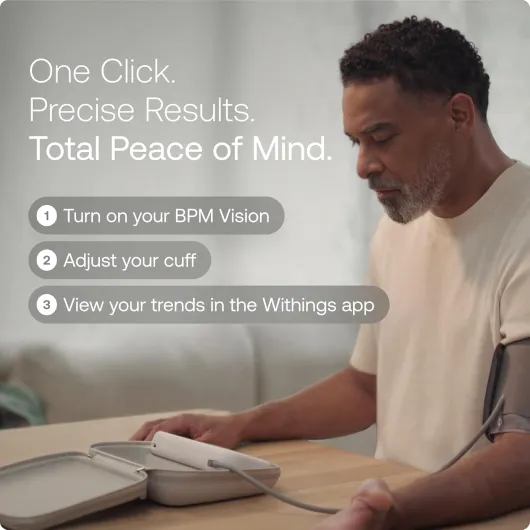
What you actually get with the BPM Vision
Out of the box, you get the main unit with the cuff attached, a protective hard case that also doubles as a stand, and a charging cable. The whole thing is bigger than the ultra‑compact cuff‑only models, but it still fits in a drawer or a backpack without drama. It feels more like a small gadget than a medical machine, which is honestly less intimidating if you’re using it daily at home.
The screen is the star here. It’s a 2.8" LCD, big enough that you can read it from arm’s length or even from the table if it’s on the stand. It shows the numbers clearly plus the colored bar that maps to US hypertension categories. It also gives you basic hints during measurement, like how to position your arm and when to stay still. Compared to my old Omron with a tiny gray display and almost no guidance, this feels more modern and easier for older relatives to use without me explaining every time.
Function‑wise, it measures systolic, diastolic, and heart rate. You can do a single reading or a 3‑measurement series to get an average, which is useful if your numbers bounce around. The device connects to the Withings app via Wi‑Fi or Bluetooth and can handle multiple users. In my case, I set up profiles for myself and my partner, and it automatically sorts the readings in the app. You can also export or share the history with your doctor as a PDF, which is way cleaner than scribbling numbers on paper.
Overall, the presentation is pretty straightforward: it’s a connected home BP monitor with a strong focus on clarity and data tracking. No gimmicky features, no weird extras. It does one main job—measure blood pressure and log it automatically—and everything is built around that. If you’re expecting a whole ECG lab in there, this isn’t it. But if you want a BP cuff that actually talks nicely to your phone and health apps, this one checks that box.
Effectiveness: accuracy and real‑world reliability
For effectiveness, I focused on two things: accuracy and consistency. I compared the readings from the Withings BPM Vision with measurements taken at my doctor’s office and with another home cuff (an older Omron). Over several days, the numbers from the Withings unit were either identical to the doctor’s or within a couple of points (2–4 mmHg) for both systolic and diastolic. That’s well within what I’d call reliable for home monitoring.
At home, I did back‑to‑back tests: one reading with the Withings, one with the Omron, under the same conditions (same arm, same position, a couple minutes apart). The Withings was usually slightly more consistent between multiple attempts. The Omron sometimes gave me a bigger spread between measurements, especially when my heart rate was a bit high. With the Withings, using the 3‑measurement average mode gave me a result that felt more stable and less random. For someone tracking hypertension or borderline numbers, that average feature is useful.
The color‑coded result bar is also surprisingly effective. Instead of just seeing 132/86 and wondering if that’s good or bad, you immediately see if you’re in the green, yellow, or higher risk zones. It’s not medical advice, but it’s enough to tell you, “ok, this is a bit high today” without googling ranges every time. For my doctor visits, being able to show a clean graph in the app, with dates and times, was more convincing than me saying “it’s usually fine at home”.
Overall, in practice, I trust the readings from this device. It feels like a medical‑grade tool adapted for home, not a toy. That said, it’s still a home device: if you’re sloppy with positioning or rushing, you can get weird numbers like with any cuff. Follow the instructions, sit still, take an average when it matters, and it does the job well. For long‑term tracking and sharing data with a doctor, it’s clearly better than a cheap, disconnected monitor.
Pros
- Accurate and consistent readings with clear color‑coded feedback on a large screen
- Automatic Wi‑Fi/Bluetooth sync to the Withings app and Apple Health for easy long‑term tracking
- Practical case that doubles as a stand, plus simple on‑screen tutorials that guide proper use
Cons
- High price compared to basic blood pressure monitors with similar core measurement function
- Initial setup and pairing can be finicky, especially on some phones and networks
Conclusion
Editor's rating
The Withings BPM Vision is a solid, connected blood pressure monitor that focuses on clarity and long‑term tracking. The big, bright screen with color‑coded zones makes it easy to understand your readings at a glance, even if you’re not into medical numbers. Accuracy is on point in real‑world use, and the 3‑measurement average mode is useful if your values tend to jump around. Comfort is standard BP‑cuff level: not cozy, but totally fine for daily use.
Where it really stands out is the Wi‑Fi/Bluetooth sync and app integration. If you like seeing graphs, trends, and sharing clean reports with your doctor, this device makes that part almost effortless. Battery life is low‑maintenance, and the case/stand combo is more practical than it looks at first. The main downsides are the high price and the sometimes annoying initial setup, especially if your phone or Wi‑Fi is picky. Once it’s configured, it works well, but that first half hour can be frustrating.
Who is it for? People who need to monitor their blood pressure regularly, care about data history, and either already use Withings products or plan to. Also good for families where several adults want to track their numbers in separate profiles. Who should skip it? Anyone who just wants a cheap cuff to check their blood pressure once in a while and doesn’t care about apps, Wi‑Fi, or graphs. For them, a basic model will be more than enough and much lighter on the wallet.